Set Duration and Resolution Every Time
Both are required on both models: duration takes the string "5" or "10", and resolution takes 720p or 1080p.
Wan 2.5 API from Alibaba is designed for cinematic AI video generation, supporting both text-to-video (wan2.5-t2v-preview) and image-to-video (wan2.5-i2v-preview). It natively synchronizes visuals with dialogue, ambient sound, and background music. With support for multiple resolutions (720p, 1080p) and aspect ratios (16:9, 9:16, 1:1), the API delivers flexible outputs suitable for social media, advertising, and creative storytelling.
The text prompt describing the desired video motion
0/800Click to upload or drag and drop
Supported formats: JPEG, PNG, WEBP Maximum file size: 10MB
URL of the image to use as the first frame. Must be publicly accessible
The duration of the generated video in seconds
Video resolution. Valid values: 720p, 1080p
Negative prompt to describe content to avoid
0/500Whether to enable prompt rewriting using LLM
Random seed for reproducibility. If None, a random seed is chosen
A configurable parameter. Defaults to true in the Playground.
Explore different use cases and parameter configurations
The text prompt for video generation. Supports Chinese and English, max 800 characters.
0/800The duration of the generated video in seconds
The aspect ratio of the generated video
Video resolution tier
Negative prompt to describe content to avoid. Max 500 characters.
0/500Whether to enable prompt rewriting using LLM. Improves results for short prompts but increases processing time.
Random seed for reproducibility. If None, a random seed is chosen.
A configurable parameter. Defaults to true in the Playground.
Explore different use cases and parameter configurations
Complete guide to using Wan 2.5
Wan 2.5 Preview is Alibaba's video model that generates audio together with the video, in clips up to 10 seconds long. On Kie.ai it runs as two API models: wan/2-5-text-to-video and wan/2-5-image-to-video.
Both models use POST /api/v1/jobs/createTask, and results come back by callBackUrl or Get Task Details.
| Parameter | Text-to-video | Image-to-video |
|---|---|---|
| Model | wan/2-5-text-to-video | wan/2-5-image-to-video |
| Prompt | Required; up to 800 characters; Chinese or English | Required; up to 800 characters |
| Start image (image_url) | Not used | Required; a publicly accessible JPEG, PNG or WebP URL, up to 10 MB, used as the first frame |
| Duration | Required; "5" or "10" seconds | Required; "5" or "10" seconds |
| Resolution | Required; 720p or 1080p | Required; 720p or 1080p |
| Aspect ratio | 16:9, 9:16 or 1:1 | Follows the start image |
| Output size in our tests on Kie.ai | 1920×1080 at 1080p, 16:9; 720×1280 at 720p, 9:16 | 1440×1440 at 1080p from a square image; 1110×830 at 720p from a 4:3 image |
| Audio track in our tests on Kie.ai | Yes, in both tests | Yes, in both tests |
| Optional | negative_prompt (up to 500 characters), enable_prompt_expansion, seed | negative_prompt (up to 500 characters), enable_prompt_expansion, seed |
| Pricing | Shown in the pricing card above | Shown in the pricing card above |
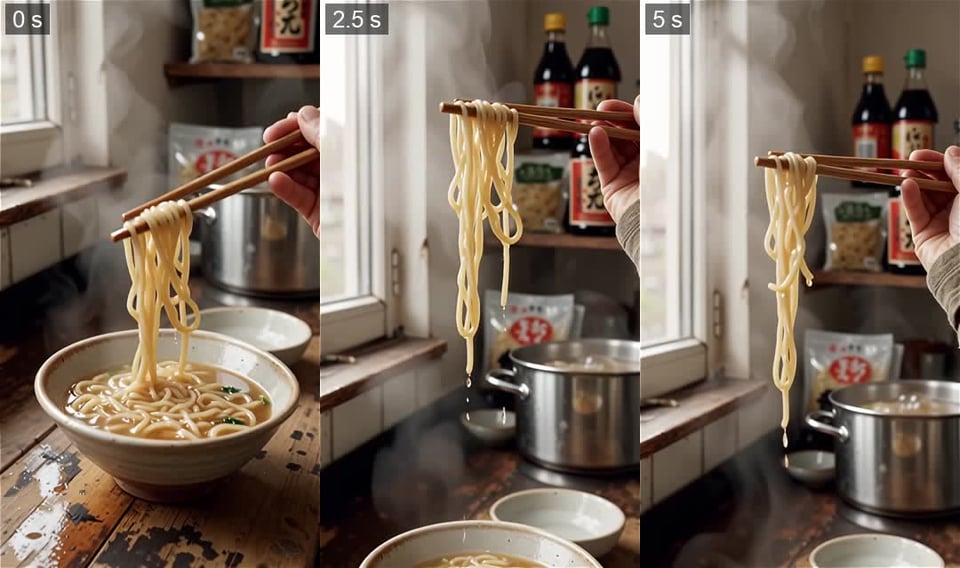
Each image below shows three frames (start, middle and end) from one video we generated with Wan 2.5 on Kie.ai in October 2026 from the prompt described in its caption; the videos also have sound, which still frames cannot show.
A 10-second 1080p landscape video: rain runs down the glass, the city lights outside stay blurred, and the camera pushes in toward the window until the cup on the table moves out of frame. The prompt also described the sounds (rain on glass, distant traffic), and the video came back with an audio track.

A 5-second 720p vertical video: chopsticks lift noodles out of the bowl while broth drips and the camera tilts up. The bottles and packets in the background carry made-up lettering, and a second bowl appears in the foreground partway through.
Starting from our robot image as the first frame, Wan 2.5 made a 10-second 1080p video of the robot waving at the camera. Its antenna lights changed from yellow to pink along the way, which the prompt did not ask for.

From a chalkboard menu image, the prompt asked for the chalk steam to rise while the lettering stayed still. By the 2.5-second mark the prices had disappeared and the cup drawing had changed shape, while the dish names stayed.

Alibaba describes Wan 2.5 Preview as supporting synchronized audio generation with visuals and 10-second videos. Wan 2.2, the earlier generation, has open weights that Alibaba has published on Hugging Face, so you can run it yourself. A practical default is Wan 2.5 when you want sound generated with the video through an API, and the earlier open model when you need weights to host yourself.
| Wan 2.5 Preview | Wan 2.2 (A14B, open weights) | |
|---|---|---|
| Audio generated with the video | Yes (Alibaba; also in our tests on Kie.ai) | Not described |
| Open weights | Not on Wan-AI's Hugging Face page (October 2026) | Yes, on Wan-AI's Hugging Face page |
Both are required on both models: duration takes the string "5" or "10", and resolution takes 720p or 1080p.
The example prompts in the Kie.ai docs end with an "Ambient audio:" line that lists the sounds to generate, and every video in our tests came back with an audio track. Write the sounds you want the same way.
In our chalkboard test the prices on the board disappeared within a few seconds, although the prompt asked for the lettering to stay still. If the start image contains text that must survive, check every frame or add the text after generation.
image_url must be a publicly accessible URL, not file content. Files that are not hosted yet can be uploaded first with the Kie.ai File Upload API (Base64, file stream or remote URL).
All models in the Kie.ai market use the same authentication method: an Authorization: Bearer YOUR_API_KEY header with the key from your Kie.ai API Key Management page.
New Kie.ai users receive 80 free credits for testing. Your account has one credit balance that all generation services draw from; check it with the Get Remaining Credits API.
Kie.ai provides this model as an API with a playground; there is no app to download or install. There are no GPUs or model weights to manage.